:format(webp))
:format(webp))
A Practical Guide to Modernizing Your Legacy App with ReactJS
In this article, you’ll learn how to turn an aging application into a fast, accessible, and secure ReactJS-powered solution. You’ll get step-by-step tactics—from initial assessment to deployment—plus fresh insights on incremental migration, state management, accessibility, testing, and more.
Assessing Your Legacy Application
Before writing a single React component, you need a clear picture of what you’re dealing with.
Conduct a code audit to identify outdated libraries, security gaps, and performance bottlenecks.
Map your current UI/UX flows to spot usability issues.
Document data sources, APIs, and integrations.
Step | Description |
|---|---|
Code Audit | Identify outdated libraries, security gaps, and performance bottlenecks. |
Map UI/UX Flows | Spot usability issues. |
Document Data Sources | Record APIs and system integrations. |
“A detailed inventory of your system’s components helps you prioritize migration phases.” – Martin Fowler
Crafting a Modernization Roadmap
A solid plan prevents surprises down the line. Your roadmap should include:
Goals and success metrics (performance targets, accessibility scores)
Phased delivery milestones
Budget and resource estimates
Risk-mitigation strategies
Phase | Details |
|---|---|
Goals & Success Metrics | Define performance targets and accessibility benchmarks. |
Phased Milestones | Key deliverable dates. |
Budget & Resources | Estimated costs and staffing. |
Risk Mitigation | Contingency plans. |
Setting Measurable Objectives
Define KPIs such as page-load times (aim for under 2 seconds, per Google’s performance recommendations ) and WCAG 2.1 AA compliance ( W3C standard ).
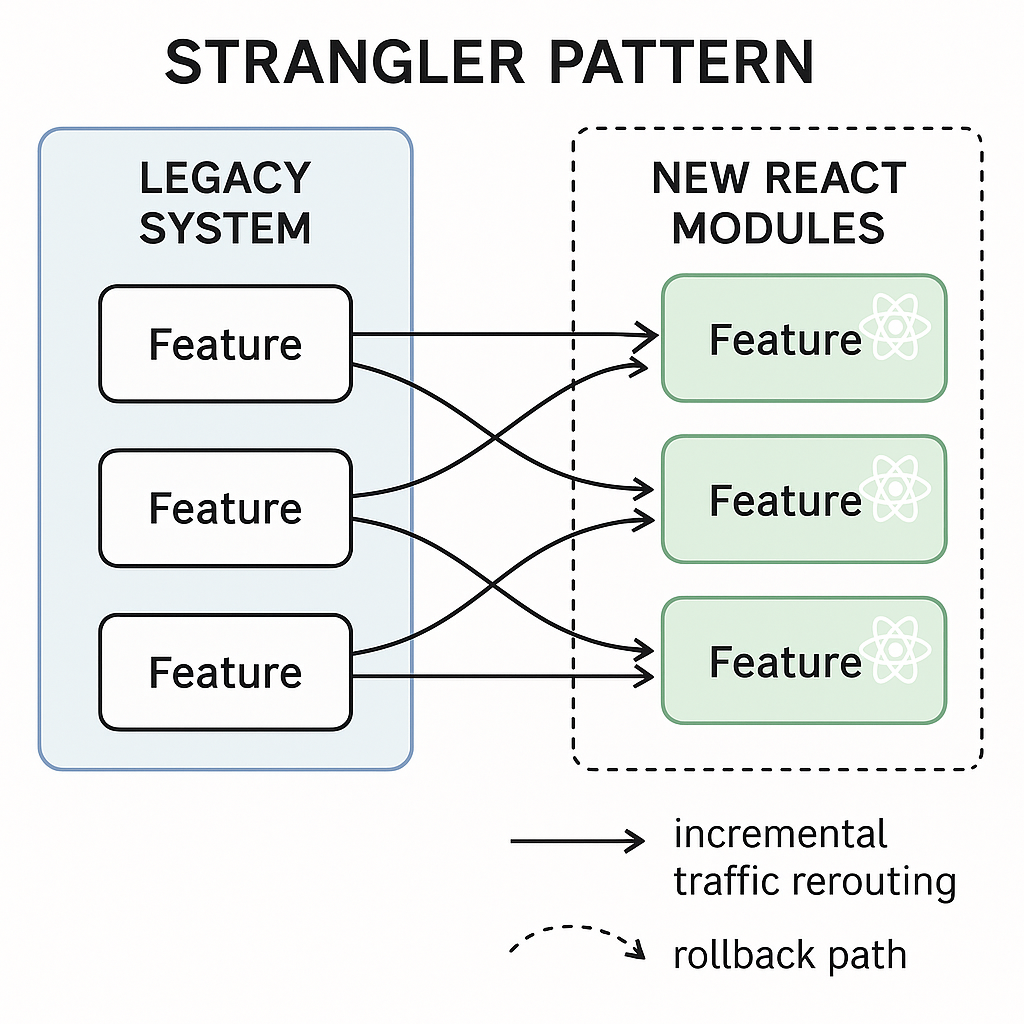
Incremental Migration with the Strangler Pattern
Instead of a big-bang rewrite, replace parts of your system piece by piece. The Strangler Pattern lets you:
Keep the old app running while you build new React modules
Switch traffic gradually to React endpoints
Roll back individual components if issues arise
Revamping State Management
Legacy apps often rely on globals or custom pub/sub setups. When you migrate:
Introduce Redux, MobX, or the built-in Context API
Coexist legacy state and new stores by syncing key entities via adapters
Retire outdated patterns as new React hooks take over
Enhancing Accessibility and UX
Older interfaces rarely meet modern standards. With React you can:
Use semantic JSX elements (button, nav, form)
Leverage Reach UI or [ARIA live regions documentation](https://developer.mozilla.org/en-US/docs/Web/Accessibility/ARIA/ARIALiveRegions) for dynamic content updates
Run automated audits in CI using axe-core
Strengthening Security
Legacy code may expose vulnerabilities like XSS or outdated dependencies. During migration:
Use the [React Security Cheat Sheet](https://cheatsheetseries.owasp.org/cheatsheets/ReactSecurityCheat_Sheet.html) to validate props
Sanitize inputs and avoid `dangerouslySetInnerHTML`
Keep third-party libraries up to date with tools like Dependabot by following GitHub’s Dependabot versioning guide
Performance: Code Splitting & Lazy Loading
After you’ve rebuilt key pages in React:
Employ `React.lazy()` and `Suspense` for dynamic imports ( React docs on code splitting )
Break your bundle into route-based chunks
Measure before and after with Lighthouse to confirm gains
Bringing Automated Testing Onboard
Integrate tests early to catch regressions:
Unit tests with Jest
End-to-end suites using Cypress
Snapshot tests for UI consistency with React Testing Library
Modernizing Your CI/CD Pipeline
A React app can ship faster with continuous workflows:
Build and test in cloud runners (GitHub Actions, CircleCI documentation )
Deploy to staging with zero-downtime strategies
Roll back automatically on failure
Tackling Data Migration
When your backend schema changes:
Version your APIs so old and new clients can coexist
Use flattening or event sourcing patterns to sync data (see ThoughtWorks’ overview of event sourcing )
Schedule migrations during off-peak hours to reduce user impact
Crunching the Numbers: ROI and Cost Control
Real-world projects often overrun budgets. A McKinsey analysis shows that large IT efforts exceed initial cost estimates by 45% on average ( McKinsey report on software project failures ). To stay on track:
Break work into sprints with regular demos
Track actual vs. planned hours weekly
Reserve 10–15% of your budget for unexpected fixes
Metric | Recommendation |
|---|---|
Sprints & Demos | Regular sprint reviews with stakeholders |
Actual vs Planned Hours | Weekly variance tracking |
Budget Reserve | Allocate 10–15% contingency |
Your Path Forward
You now have a full toolkit for migrating your legacy application to ReactJS. By assessing your code, plotting a phased transition, and adopting modern practices—from security to CI/CD—you’ll deliver a faster, safer, and more accessible product without the risk of a one-time rewrite. Start by drafting your assessment report today and chart the milestones for your first React module.
:format(webp))
:format(webp))
:format(webp))