:format(webp))
:format(webp))
How Suspense, Streaming, and Selective Hydration Actually Speed Up Your Next.js Pages (and Where to Watch Out)
This article explains how React Server Components, Suspense, streaming HTML, and selective hydration work together in Next.js to improve real-world page performance. You’ll get practical placement and debugging strategies, a look under the hood at scheduling and JavaScript costs, comparisons with Islands architecture, and actionable patterns you can apply right away.
What React Server Components (RSCs) bring to the table
React Server Components let you render components on the server and send a serialized UI payload to the client so less JS needs to run in the browser. That reduces the amount of client-side code and can shrink the amount of work needed to make pages interactive. (See the official React Server Components announcement .)
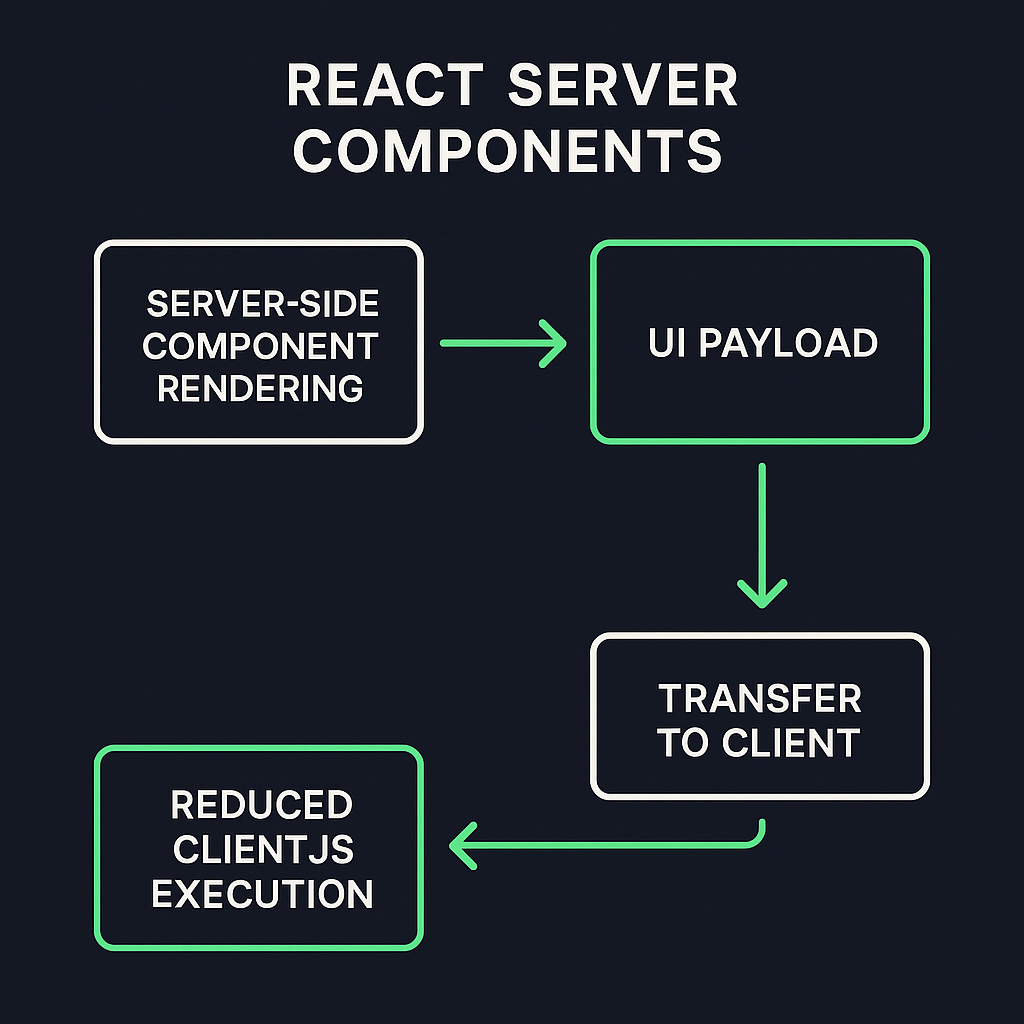
Why RSCs matter for streaming
Because RSCs can render on the server, they’re natural partners for streaming HTML: you can begin sending usable HTML to the browser immediately while heavier server-rendered pieces arrive later, improving perceived load speed. Next.js’ App Router integrates this pattern.
Suspense: the glue that prevents waterfalls
Suspense lets React mark UI regions as “waiting for data” and render a fallback immediately, while the real UI resolves asynchronously. When used with streaming, Suspense boundaries allow the server to send fallback HTML first, then stream the resolved component HTML when ready—avoiding the common “wait for everything” waterfall of traditional SSR.
Benefit: faster first meaningful paint because the browser can show fallback content instantly.
Pitfall: poorly placed boundaries can create cascading wait states.
Streaming HTML and perceived performance
Streaming means the server sends HTML in chunks instead of waiting for the whole tree to finish. That reduces time-to-first-byte for usable content and helps users see something sooner, even if parts of the page hydrate later.
Performance metrics that improve with streaming:
Largest Contentful Paint (LCP) often improves because big visible elements can arrive earlier. See web.dev’s guide on Largest Contentful Paint .
Time to Interactive (TTI) benefits when JavaScript execution is deferred and interactive bits hydrate progressively; refer to Google Web Fundamentals on Time to Interactive .
Metric | Without Streaming | With Streaming |
|---|---|---|
Largest Contentful Paint | Full tree finish | Early chunk render |
Time to Interactive | Blocking hydration | Progressive hydration |
Hydration vs. selective hydration: what actually changes on the client
Hydration is the process of React attaching event handlers and turning static server-rendered HTML into an interactive app. Traditional hydration tends to be “all-or-nothing”: large trees must be processed before interaction. Selective hydration rehydrates only important interactive components first and defers the rest to idle time, reducing blocking work on the main thread. Next.js and React use scheduling to prioritize those work units.
Aspect | Traditional Hydration | Selective Hydration |
|---|---|---|
Scope | Entire app at once | Individual components selectively |
Priority | No prioritization | Important parts prioritized |
Performance Impact | High blocking on main thread | Reduced blocking, smoother interactivity |
Use Case | Simple apps or static sites | Large, interactive or dynamic sites |
Practical pattern: prioritize interactive controls
Identify above-the-fold interactive controls (menus, search boxes, buttons) and ensure they’re rehydrated first by using small, focused client components or placing them inside early Suspense boundaries so the scheduler targets them sooner.
Debugging hydration mismatches and why useId() matters
Hydration mismatches happen when server-rendered HTML differs from the HTML React generates on the client. One common source is non-deterministic IDs or random values produced at render time. React’s `useId()` hook provides deterministic IDs that match server and client, preventing many mismatches. If client and server IDs diverge, React logs a hydration mismatch and may drop into a client-only render, costing performance.
Quick debugging checklist:
Check console for “Text content does not match” or similar hydration warnings.
Render server HTML to a static file and compare with client-rendered DOM in DevTools.
Replace ad-hoc IDs/random values with `useId()` or deterministic hashing.
Temporarily isolate suspected components behind a boundary to confirm the source.
Under the hood: concurrent rendering and task prioritization
React’s scheduler splits rendering work into units and assigns priorities so high-priority interactive work runs sooner and low-priority background work yields to the main thread. This cooperative scheduling model prevents long blocking tasks from freezing input handling and helps selective hydration work during idle periods. You can explore the scheduler package on npm for more details.
The cost of JavaScript parsing & execution during hydration
Parsing, compiling, and executing JavaScript are significant contributors to main-thread time. Large client bundles increase time spent parsing and compiling, delaying interactivity. Browser engines (V8, SpiderMonkey, JavaScriptCore) differ in parse/compile performance and optimization strategies, so the exact time cost varies by browser and device. That’s why reducing CPU-bound hydration work often yields large real-user gains on low-end devices.
Islands Architecture vs. selective hydration: choose the right tool
Islands Architecture (used by Astro, Fresh, etc.) treats most page UI as static HTML and hydrates only small interactive “islands.” This is conceptually similar to selective hydration but starts from a different development model: isolate interactivity up front instead of retrofitting hydration behavior into a monolithic React tree. See an introduction to Islands Architecture .
When to choose which:
Pick Islands when you can build pages as mostly static with isolated interactive widgets (great for content sites and landing pages).
Pick React + selective hydration when you need tight interactivity, shared state across widgets, or the React component model is central to your app.
Hybrid approach: use server components or islands for static parts and client React for complex interactive areas.
Approach | Ideal Use Case | Key Benefit |
|---|---|---|
Islands | Mostly static pages with isolated interactive widgets | High performance for content sites |
React + selective hydration | Apps needing tight interactivity or shared state | Full React flexibility and control |
Hybrid | Sites with both static and complex interactive areas | Balances speed and advanced features |
Suspense boundary placement and cascading effects
Where you place Suspense boundaries matters. Granular boundaries let independent parts render in parallel and stream as they become ready. Overly coarse boundaries can cause larger waterfalls because a single unresolved child blocks a whole region. Conversely, too many tiny boundaries may add overhead and complexity.
Best practices:
Place boundaries around distinct data-loading subtrees (lists, widgets, embedded feeds).
Avoid wrapping large portions of the page in one boundary if they have independent data requirements.
Use fallbacks that preserve layout (sized skeletons) to avoid layout shifts and CLS.
Anti-patterns to avoid:
Putting all dynamic UI under a single Suspense that delays all content until the slowest resource finishes.
Using empty or size-less fallbacks that cause layout jumps.
Measuring when streaming actually helps: network waterfalls and tools
Suspense and streaming are not a silver bullet: if your data-fetching introduces serial dependencies, streaming may not help. Use these techniques to tell whether streaming is improving performance:
Capture a DevTools Network waterfall and look for serial dependencies and blocking resources ( Chrome DevTools Network panel ).
Run WebPageTest to measure real-world metrics (LCP, TTFB, filmstrip, and CPU activity) ( WebPageTest.org ).
Trace server-side logs to see when RSC payloads are produced and how long serialization costs take.
Using idle time: requestIdleCallback and React scheduler
Selective hydration often runs lower-priority hydration tasks during browser idle periods. React can leverage cooperative yielding and browser APIs like `requestIdleCallback` (where available) to perform background hydration without interfering with input responsiveness. For the spec, see the W3C requestIdleCallback Recommendation .
Viewport-based hydration with Intersection Observer
You can defer hydration for off-screen components until they enter the viewport using Intersection Observer, reducing upfront work and prioritizing content the user actually sees. This pattern pairs well with selective hydration and Suspense: render a light placeholder server-side, then hydrate when the element becomes visible. Refer to the Intersection Observer API spec for details and examples.
Gotchas:
Ensure fallbacks maintain layout size to avoid layout shift.
Watch for race conditions where visibility-triggered hydration conflicts with user interaction if the user scrolls quickly.
RSC serialization overhead and payload size considerations
Server Components must serialize VDOM payloads to send to the client, and large component trees increase serialization size and CPU cost on both server and client. Minimizing serialized state and avoiding shipping large data blobs inside components reduces payload size and improves stream throughput. The Server Components RFC and ecosystem docs describe these trade-offs; see the Server Components RFC on GitHub .
Optimization tips:
Move heavy data fetching to endpoints and stream minimal props.
Avoid embedding large arrays or binary data inside serialized components.
Cache serialized fragments when possible.
Third-party scripts: why they’re still the silent performance killer
Analytics, tag managers, ads, and other third-party scripts can block rendering and hydration if they run on the main thread or insert blocking resources. During streaming or selective hydration, these scripts can still steal CPU and degrade interactive times. Strategies:
Load non-essential third-party scripts after hydration or during idle time.
Use `async` or `defer` attributes where appropriate.
Consider server-side measurement proxies or batching to reduce client script footprint.
Quick actionable checklist (so you can get started now)
Identify above-the-fold interactive elements and convert them to small client components or ensure they’re early Suspense children.
Use deterministic IDs (`useId`) to prevent hydration mismatches.
Add granular Suspense boundaries around independently-loading widgets.
Defer non-critical hydration using Intersection Observer or idle callbacks.
Audit JS parsing and execution costs with DevTools Performance and WebPageTest; split and reduce bundles where needed.
Review third-party scripts and defer or server-side them where possible.
Parting thoughts for the long run
React’s combination of Server Components, Suspense, streaming, and selective hydration gives you the tools to dramatically reduce client-side work and improve perceived performance. But these features are powerful and subtle—to get sustained gains you need careful Suspense placement, deterministic server/client output (`useId`), attention to JS parsing cost, and a plan for third-party scripts and payload sizes. When you combine good developer patterns with measurement (DevTools, WebPageTest) you’ll see the wins in real-user metrics like LCP and TTI. For hybrid or content-led sites, consider Islands approaches as an alternative or complement depending on your needs.
If you want, tell me about a specific page you’re optimizing and I’ll suggest Suspense boundary placements, which components to convert to server components, and a step-by-step plan to reduce hydration work.
:format(webp))
:format(webp))
:format(webp))