:format(webp))
:format(webp))
How React Server Components and Streaming SSR improve SEO — and the real trade-offs you must plan for
Read this and you’ll understand how Server Components (RSC) and streaming server-side rendering (SSR) change what search engines see, what users feel, and which engineering choices matter for ranking. I cover the core ideas top articles explain, then add practical guidance you won’t find there: hydration-mismatch risks, selective hydration patterns, edge rendering, dynamic metadata at request time, streaming prioritization, ISR vs streaming trade-offs, and safe ways to use third-party scripts.
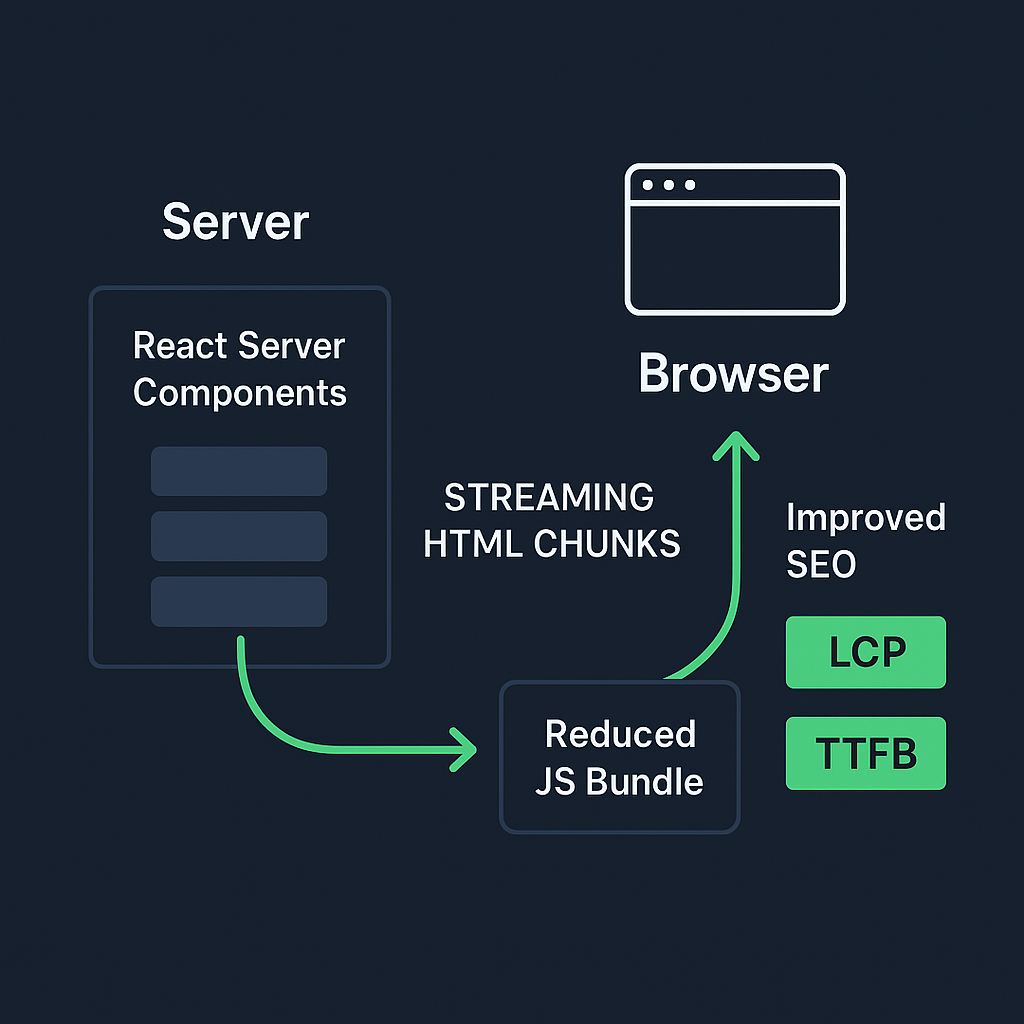
Why Server Components and streaming matter for search
React Server Components let you render parts of your UI entirely on the server so the browser receives HTML without shipping component code to the client. That reduces the JavaScript bundle the browser must parse and run, which improves page load metrics that search engines care about. See the Next.js guide to Server Components for the core concept and usage patterns.
Streaming SSR sends HTML to the browser as it’s produced (often using React Suspense) so above-the-fold content can appear sooner, improving Time to First Byte (TTFB) and perceived load times. The Vercel blog on streaming SSR and community resources explain how streaming and Suspense enable progressive rendering.
Why this matters for search: search engines prefer fast, crawlable pages and use metrics such as Largest Contentful Paint (LCP) when assessing page experience. Improving LCP and reducing the amount of client-side JS helps pages rank and retain users. See the Core Web Vitals overview for more details.
How RSC changes what search engines index
Server Components produce fully rendered HTML for the server-side parts of the page, so crawlers that do not execute heavy JavaScript still see the content. That reduces reliance on client-side hydration for indexability. Web.dev covers the SEO patterns that make this possible.
But you must still ensure interactive parts are handled correctly: some components remain client-side and require hydration, which leads to the next risk area.
Hydration mismatch errors and the SEO risk
When the HTML served from the server differs from what client-side React renders during hydration, you can get hydration mismatches. Those may cause visible flicker, content reordering, or client-side errors that hide or change content the crawler previously saw — potentially harming indexing and search ranking.
Hydration mismatches happen when server-rendered markup depends on data or random values that differ on the client, or when a component relies on browser-only APIs during initial render. Refer to the React hydration guidance for best practices.
Google and other engines execute JavaScript for rendering, but inconsistent markup can still confuse bots or cause them to index the fallback state instead of final content. See Google’s JavaScript SEO basics for how crawlers handle JavaScript.
Cause | Description | Mitigation |
|---|---|---|
Non-deterministic markup | Server output differs from client due to random/time-based data | Ensure deterministic data sources or consistent rendering inputs |
Browser-only APIs on server | Components use window/document during SSR | Guard calls behind environment checks or convert to client components |
Inconsistent data fetching | Data available at SSR time differs from that at hydration | Synchronize server and client data loading strategies |
Conditional rendering by user agent | Markup changes based on user agent/bot detection | Avoid user agent-specific rendering during SSR |
Mitigation tips:
Keep server and client rendering deterministic for the same inputs.
Use feature flags or environment checks to avoid browser-only logic during server render.
Log and monitor hydration warnings in dev and fix any mismatches before rollout.
Selective hydration and partial interactivity patterns
You don’t have to hydrate the whole page. Hydrate only the interactive components and keep static pieces as server-rendered HTML. That reduces JS execution and improves Core Web Vitals.
Pattern: mark shell and content-heavy components as server components, then render specific interactive widgets as client components that hydrate when needed.
Lazy or deferred hydration: delay hydrating non-essential widgets until user interaction or idle time to reduce Time to Interactive (TTI).
Practical rule: prefer server components for content and only ship client code for parts that need event handlers or browser APIs.
Edge computing and distributed rendering: reducing latency for global users
Rendering Server Components from the edge (Vercel Edge Functions, Cloudflare Workers) places HTML generation closer to users, cutting TTFB for worldwide audiences and improving perceived speed.
Cloudflare Workers provide edge compute for generating responses near the user. See the Cloudflare Workers documentation for setup and usage.
When to choose edge rendering:
Your audience is globally distributed and you need low latency for initial HTML.
Pages are largely dynamic per request and can’t be served fully cached at CDN POPs.
Edge costs and cold-start characteristics differ from regional servers, so test latency and cost for your traffic patterns.
Dynamic metadata generation at request time
For social previews, rich snippets, and accurate search indexing, generate meta tags and structured data per request. Static meta templates are fine for many pages, but if content is user- or locale-specific, compute metadata server-side so crawlers and social scrapers see the correct values.
Avoid generating metadata client-side only, because some crawlers and social bots may capture the pre-hydration HTML.
Streaming prioritization and resource hints
You can control what arrives first in a streaming response by placing Suspense boundaries where you want prioritized content and by using resource hints.
Use Suspense boundaries to let critical content stream immediately and defer lower-priority fragments.
Add preload/prefetch link headers or tags for above-the-fold assets so browsers fetch them early, improving perceived LCP.
Consider the order of component rendering: move hero sections and metadata into the earliest stream chunks.
Combining streaming with HTTP Early Hints can further accelerate critical resources when your platform supports them.
ISR vs. Streaming SSR — choosing the right rendering model
Incremental Static Regeneration (ISR) and streaming SSR solve different needs:
ISR is great when pages are mostly static but need periodic updates. It serves cached HTML (fast, cheap), then revalidates in the background. Use it for product pages, blogs, or catalog pages where content changes but not every request.
Streaming SSR is best when each request must be customized (user-specific content, rapidly changing data) and you want progressive rendering. It can cost more in CPU and reduce cacheability.
Trade-offs:
SEO and crawlability: both can deliver crawlable HTML. ISR serves static HTML that’s extremely crawler-friendly; streaming SSR can give faster perceived loads for dynamic pages.
Infrastructure cost: streaming SSR tends to be more expensive per request than cached ISR pages.
Freshness: streaming SSR can return the freshest data per request.
Criteria | ISR | Streaming SSR |
|---|---|---|
SEO friendliness | Very SEO-friendly (static HTML, easily crawled) | SEO-friendly (dynamic, but delivers fast HTML) |
Infrastructure cost | Low (can serve cached static pages) | Higher (dynamic rendering per request) |
Data freshness | Fresh after revalidation or on demand | Always the freshest (real-time per request) |
Cacheability | Highly cacheable (static output is reusable) | Limited cacheability (dynamic content) |
Decide based on how dynamic the content is, expected traffic patterns, and cost constraints.
Search engine bot detection and adaptive rendering — proceed with care
Some teams serve simplified HTML to known crawler user agents to save CPU. While that can work, it’s risky:
Google recommends serving the same content to users and crawlers (avoiding cloaking). If you serve different content, you risk penalties.
Detecting crawlers by user agent is brittle; user agents change and bad actors can spoof them. Use server-side heuristics only when you have a clear, defensible reason and ensure you’re not hiding content from users.
A safer approach is adaptive rendering that aims for parity: return fully rendered HTML for all requests while optionally adding server-side optimizations for known crawler pathways (e.g., slightly different caching headers), but keep content identical.
Middleware-based SEO optimizations
Use middleware to handle cross-cutting SEO needs without touching component rendering:
Inject or rewrite canonical URLs, perform redirects, set cache headers, or add security headers at the edge or server layer. Next.js middleware lets you run code before a request is completed.
Implement A/B experiments or country-based redirects without changing server component logic; middleware can set cookies or rewrite paths transparently.
Keep middleware fast — it runs on each request and can add latency if heavy.
Bundle size analysis for Server Components
RSC promises smaller client bundles, but you should measure the real impact.
Use tools like Webpack Bundle Analyzer to find large client-side modules and confirm RSC has reduced shipped JS.
Track metrics over time: Total JS payload, main-thread work, parse/compile times, and their effect on LCP and Time to Interactive. See Lighthouse and Web Vitals measurement for guidance.
Keep a checklist to decide component placement:
If it needs browser APIs or events → client component.
If it’s content-only → server component.
If it’s borderline, measure both options.
Handling third-party scripts and analytics with streaming SSR
Third-party scripts can block rendering and degrade Core Web Vitals if injected incorrectly. With streaming SSR:
Defer non-essential scripts using async/defer or load them after hydration to avoid blocking the stream.
Use server-side collection where possible (server-side analytics or logging) to avoid shipping heavyweight tags to the client.
When you must include client-side pixels, inject small async loaders or load them after critical content has streamed.
Measure the effect of each external script in isolation and remove or gate scripts that impose too much cost.
Quick checklist you can apply today
Checklist Task | Benefit |
|---|---|
Prefer server components for static content; keep interactive bits as client components | Reduces JS payload and improves load metrics |
Add Suspense boundaries around critical UI so streaming delivers the hero first | Improves perceived load time and Largest Contentful Paint (LCP) |
Generate metadata server-side per request when content changes per user or locale | Ensures accurate SEO and tailored experience |
Test for hydration mismatches during development and fix deterministic rendering issues | Prevents runtime errors and inconsistent UI |
Consider serving from the edge for global audiences but compare latency and cost | Reduces latency for users worldwide; controls infra cost |
Profile bundle size and main-thread work to confirm gains from RSC | Validates performance improvements and bundle efficiency |
Prefer server components for static content; keep interactive bits as client components.
Add Suspense boundaries around critical UI so streaming delivers the hero first.
Generate metadata server-side per request when content changes per user or locale.
Test for hydration mismatches during development and fix deterministic rendering issues.
Consider serving from the edge for global audiences but compare latency and cost.
Profile bundle size and main-thread work to confirm gains from RSC.
Final notes for implementation (a tight plan)
Start small: convert one content-heavy page to Server Components and enable streaming for it. Measure LCP, TTI, and total JavaScript before and after. Watch for hydration warnings and check rendered HTML via “View source” and in Google’s mobile-friendly/test tool to ensure crawlers see the intended output. Iterate to expand RSC adoption only after the initial pages show real user-experience and SEO improvements.
Wrap up
You’ll get the biggest SEO wins by delivering crawlable HTML fast, keeping client-side JavaScript minimal, and avoiding hydration surprises. Use streaming to prioritize above-the-fold content, pick ISR when pages can be cached, and move rendering to the edge when global latency matters. Watch for pitfalls — mismatched hydration, third-party scripts, and brittle crawler detection — and instrument everything so you can measure the impact on real users and search results.
:format(webp))
:format(webp))
:format(webp))