:format(webp))
:format(webp))
How to Build a Scalable, Reliable React Chat Application
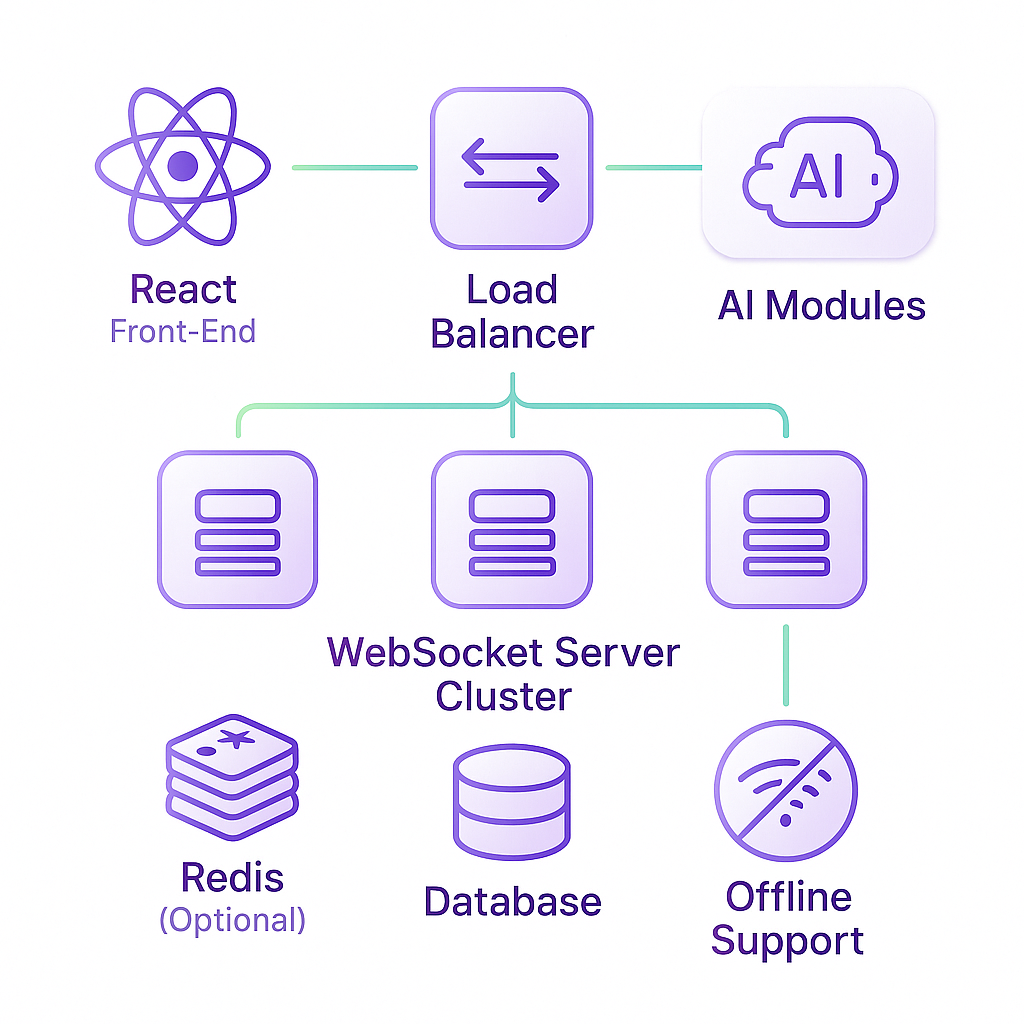
In this guide, you’ll explore everything you need to create a React-based chat app—from initial setup and state management to real-time messaging, performance tweaks, accessibility and advanced features like offline support, security hardening, and AI-driven enhancements. By the end, you’ll have a blueprint for a chat system that serves small groups or millions of users.
Getting Started with Your React Chat Project
Before writing any UI, set up a solid foundation:
Project Initialization
Use Create React App for a quick start:
npx create-react-app react-chat

cd react-chat
Refer to the official Create React App documentation for detailed setup instructions and configuration options.
Install Core Dependencies
- WebSocket library: `socket.io-client` or native WebSocket
- State management: optionally `react-router` and `react-query`
- Styling: `styled-components` or `CSS Modules`
- Testing: `jest`, `@testing-library/react`
Folder Structure
Folder/File | Purpose |
|---|---|
components | Reusable React components |
contexts | Global state providers |
hooks | Custom hooks |
services | API/WebSocket wrappers |
utils | Utility functions |
App.js | Root component |
index.js | Entry point |
State Management and Real-Time Communication
Managing global state and live updates is key for chat:
Using React Context and Hooks for Chat State
Create a `ChatContext` via the React Context documentation for shared state like current room, user info, and message list.
Use custom hooks—e.g., `useChat()`—to subscribe components to updates without prop drilling.
Setting Up WebSockets for Live Messaging
Connect to a WebSocket server:
import io from 'socket.io-client';

const socket = io('https://chat.example.com');
Listen for and emit events (`message`, `join`, `typing`), handling reconnections automatically.
Event | Description |
|---|---|
message | Receive and send chat messages |
join | User enters or leaves a room |
typing | Typing indicator events |
reconnect | Automatic reconnection handler |
For peer-to-peer calls, integrate WebRTC for audio/video streams using the MDN WebRTC guide .
UI/UX Essentials: Layout, Virtualization, Accessibility, i18n
A smooth interface makes users stick around:
Chat Layout & Styling
Build a scrollable messages container; use flex or grid for responsive sizing.
Message Virtualization
Render only visible messages with React Window to keep rendering fast, as shown in the React Window introduction .
Typing Indicators & Auto-Scroll
Show “User is typing…” and programmatically scroll to the latest message.
Accessibility
Add `aria-live="polite"` to message lists, ensure focus management for keyboard users.
Internationalization (i18n)
Use libraries like `react-intl` to swap text and date formats by locale—important for global reach.
Performance Optimization
For low latency and high throughput:
Code Splitting & Lazy Loading
Dynamically load routes or heavy components with `React.lazy` and `Suspense`.
Memoization
Wrap message item components in `React.memo` to prevent unnecessary renders.
Server-Side Clustering & Load Balancing
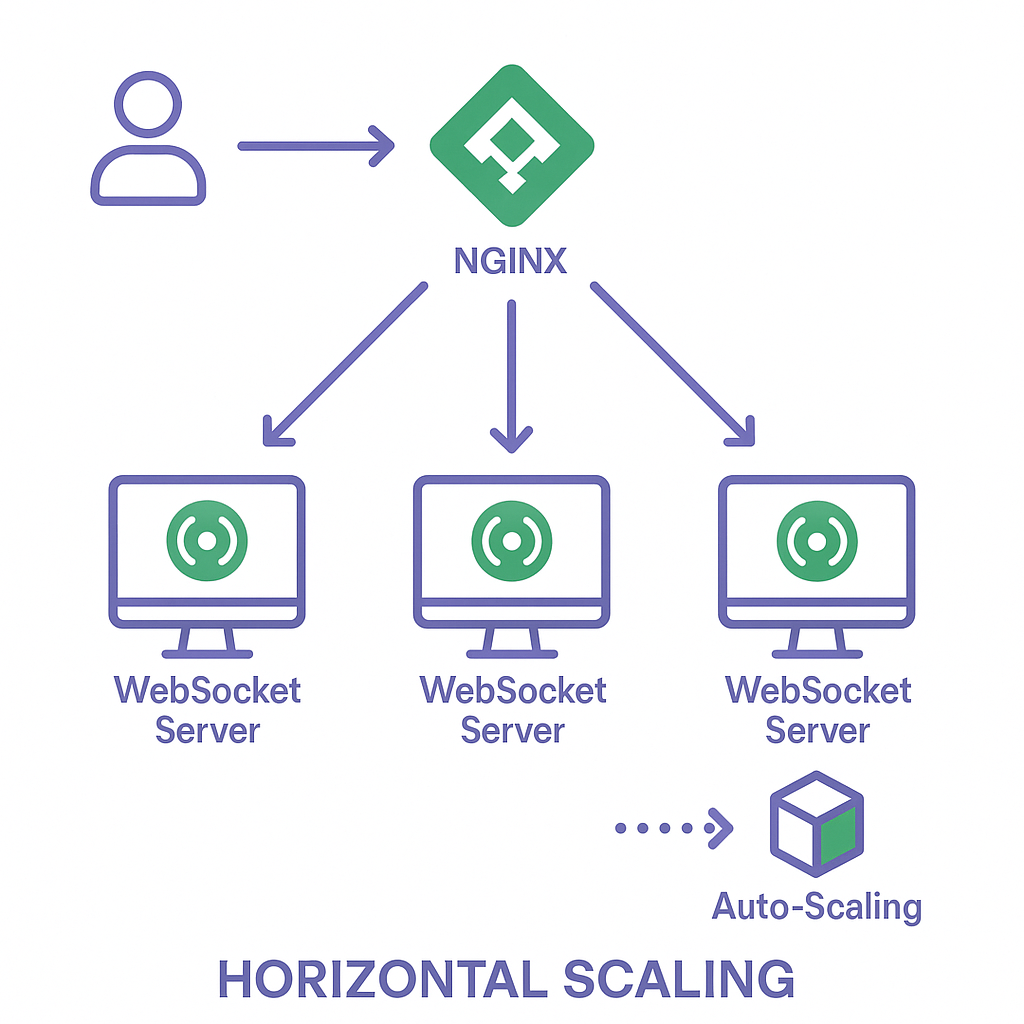
Deploy WebSocket servers behind an NGINX load balancer or use managed services that auto-scale.
Testing and Deployment
Quality assurance and reliable rollout keep your app healthy:
Unit & Integration Tests
Employ Jest and React Testing Library to verify UI and hook logic.
End-to-End Tests
Automate browser workflows with Cypress to simulate login, sending messages, connectivity drops.
Continuous Deployment
Push to services like Vercel, Netlify, or AWS Amplify; set up pipelines for staging and production.
Advanced Features for Production Chat Systems
Once the basics are solid, layer on these capabilities for enterprise-grade chat:
Optimizing for Scalability
Horizontal scaling of WebSocket servers
Auto scaling groups on AWS or Kubernetes pods
Message Delivery Guarantees
Acknowledgments (ACKs) and retry logic
Sequence numbers to enforce message order
Data Persistence & History
Store messages in a time-series database like InfluxDB overview
Full-text search with Elasticsearch
Security Beyond Authentication
End-to-end encryption via the Signal Protocol documentation
Rate limiting at the API layer to reduce spam
Signed upload tokens for secure media handling
Push Notifications Integration
Web Push via Service Worker primer on Google Developers
Mobile push through FCM (Firebase Cloud Messaging)
Offline Scenarios & Synchronization
Queue outgoing messages in IndexedDB
On reconnect, sync missed events from the server
Customizable Roles & Permissions
Define roles (admin, moderator, member) in your auth backend
Enforce permissions in both UI and server routes
Real-Time Analytics & Monitoring
Track active sessions, message throughput, error rates in dashboards (e.g., Grafana)
Integrating AI Features
Chatbots for FAQ automation
Sentiment analysis via cloud APIs
Smart reply suggestions using NLP models
What’s Next on Your Chat Journey
You now have a roadmap for building a React chat application that performs well, scales smoothly, and keeps users engaged. Start coding your basic chat UI, then progressively layer in the advanced features that fit your project’s goals. Keep an eye on performance metrics and user feedback as you roll out each enhancement—this iterative approach ensures you deliver a robust, user-friendly chat experience.
:format(webp))
:format(webp))
:format(webp))