:format(webp))
:format(webp))
Mastering the React Compiler: Automatic Memoization Deep Dive
You’ve probably heard that React’s new Compiler can skip renders for you, but how does it really work under the hood? In this article, you’ll learn what the React Compiler does, why it’s safe, how it interacts with effects and hooks, and when you might still reach for `useMemo` or `React.memo`. You’ll also see how to inspect compiler decisions in DevTools and how to get started today.
What Is the React Compiler?
The React Compiler is a build-time step that analyzes your components and automatically applies memoization where it’s safe. Instead of wrapping every component with `React.memo`, the compiler injects checks around individual props, skipping subtrees whose inputs haven’t changed.
Key points:
It transforms your JSX before shipping to skip renders for unchanged props and children, as detailed in the React blog announcement on the React Compiler .
It respects all of React’s rules of hooks and renders, so you don’t change your code style to opt in, as explained in the Patterns.dev article on React Compiler maintaining hook rules .
By default, it targets granular memoization at the prop level rather than entire component trees, following the React RFC 268 on default granular memoization .
How Automatic Memoization Works
At compile time, the compiler runs a purity analysis:
It checks if your component function is pure (no side effects during render).
It ensures you’re not mutating props or reading non-deterministic values (like `Date.now()`; see the MDN documentation for Date.now() ).
It injects equality checks around each prop to decide if it’s changed.
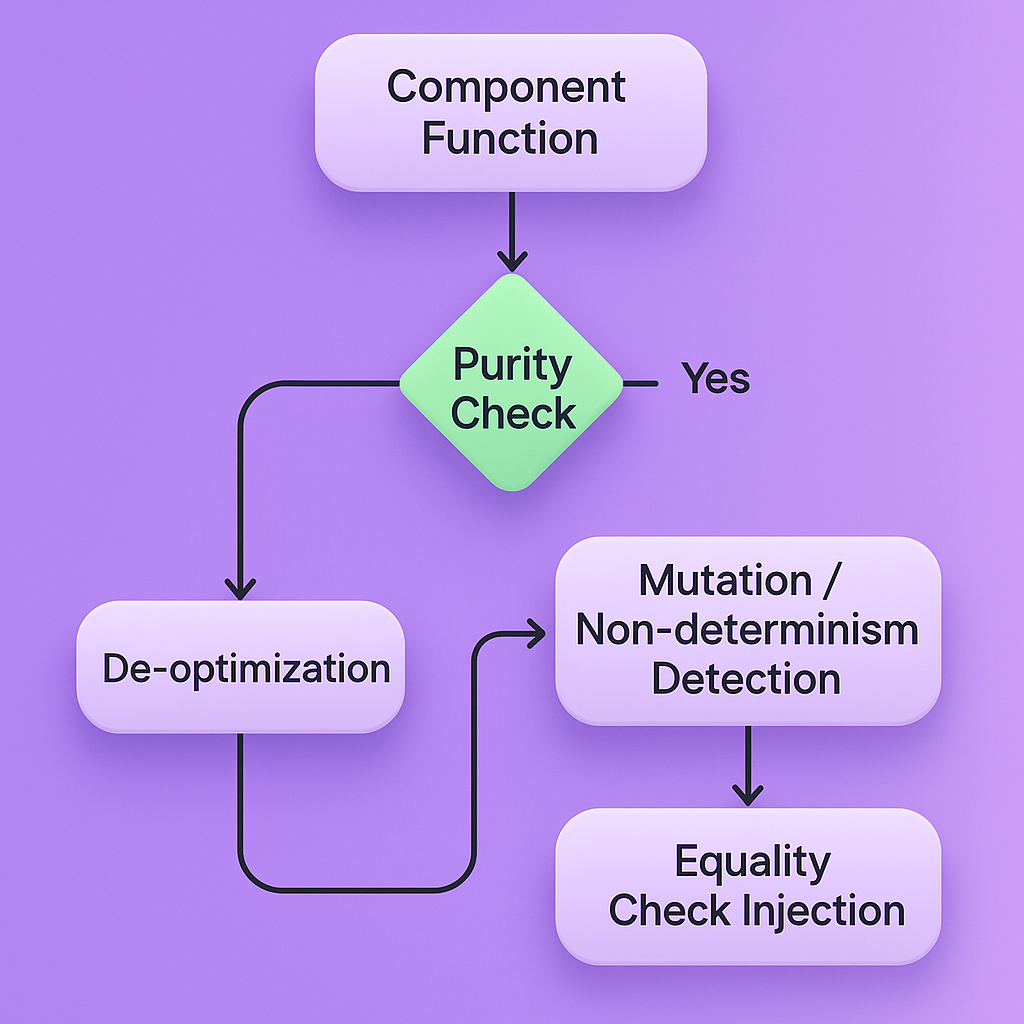
When a prop fails these checks (for example, you mutate an object prop), the compiler “de-opts” and falls back to a full render for that subtree.
Patterns That Prevent Auto-Memoization
Mutating props or reading from mutable refs inside render.
Using non-deterministic getters (e.g., `Math.random()`).
Closing over mutable variables that change between renders.
By avoiding these patterns, you let the compiler skip more renders safely.
Working with Effects
Automatic memoization can change how often your `useEffect` callbacks fire:
Dependency arrays are inferred based on props and state used inside the effect, as described in the legacy React docs on useEffect .
If a prop is skip-memoized (unchanged), the effect may not re-run.
To avoid missed updates, you can:
Bullet list of tips:
Always declare every variable you use inside `useEffect` in its dependency array.
Wrap event handlers or callbacks passed to effects with `useCallback` if they capture props that don’t change.
Test effects under scenarios of both changed and unchanged props to ensure correctness.
Inspecting Your Memoization: DevTools and Diagnostics
React DevTools now shows compiler decisions on each component:
A memoization badge appears next to components that are skip-memoized.
Warnings are emitted in development if a pure component is de-opted, with hints on which prop or pattern blocked it.
You can hover over a prop in DevTools to see why it was considered “unchanged” or “changed.”
See the React DevTools documentation for more details on these diagnostic features.
Beyond Components: Hooks and Context
Hook-Level Memoization
The compiler can also optimize custom hooks:
If a hook call is pure and its parameters are stable, the compiler may cache its return value across renders.
This helps expensive hooks (data transformations, complex calculations) skip re-execution when inputs don’t change.
Context and Selector-Style Subscriptions
For large context values, the compiler narrows subscriptions:
It treats each property of a context object like a separate prop, only re-subscribing to changed values.
This mirrors the benefits of libraries like `use-context-selector`, as available on the use-context-selector package on npm , without extra code.
When to Reach for Manual Memoization
Even with the compiler, you may still use:
`useMemo` or `useCallback` when you need a stable object or function identity for external libraries.
`React.memo` for class-based components or when you want explicit control.
Imperative APIs (refs or animation handles) that require a guaranteed persistent identity.
Over-memoizing can obscure compiler analysis or add unnecessary overhead, so prefer compiler defaults unless you have a specific need.
Getting Started with the React Compiler
Upgrade to React 19 and install the compiler preset:
npm install react @compiler/react
Add the compiler plugin to your build config:
// babel.config.js
module.exports = {
plugins: ['@compiler/react']
};
Run your tests and watch for DevTools warnings to catch de-opts.
Gradually migrate critical leaf components first, then expand across your app.
For detailed setup steps and advanced configuration options, consult Babel’s documentation for the React Compiler plugin .
Your Next Render Milestone
You now have a clear picture of how the React Compiler automatically memoizes components, hooks, and context, and how to diagnose its decisions in DevTools. By understanding purity analysis, effect interactions, and when manual memoization still matters, you can write React apps that remain fast and predictable without the overhead of boilerplate wrappers. Start integrating the compiler today and watch your render counts drop.
:format(webp))
:format(webp))
:format(webp))