:format(webp))
:format(webp))
Migrating from KnockoutJS to React: Your Complete Roadmap
When you finish reading this, you’ll understand not only why React often makes sense over KnockoutJS but also how to migrate step by step—from basic observables to advanced topics like routing, validation, server rendering and performance tuning. You’ll see code patterns, tools and best practices that top guides miss, so you can move your project forward with confidence.
Why React? Motivation and Key Differences
Switching from KnockoutJS to React often comes down to three main factors:
Component-based architecture. React breaks UI into reusable components, while Knockout uses templates and viewmodels.
Unidirectional data flow. React’s single source of truth makes state easier to trace ( React state FAQ ).
Ecosystem and community. React powers over 40 % of modern websites, backed by a vast ecosystem of libraries and tools ( W3Techs on JavaScript frameworks ).
Factor | KnockoutJS Implementation | React Implementation |
|---|---|---|
Component-based architecture | Templates & viewmodels | Reusable components |
Data flow | Two-way bindings & subscriptions | Unidirectional single source of truth |
Ecosystem & community | Smaller plugin ecosystem | Vast ecosystem with broad community support |
Knockout shines for simple MVVM scenarios, but as your app grows, managing interdependent observables and templates can become unwieldy. React’s declarative rendering and mature tooling help prevent subscription bloat and unpredictable side effects.
Getting Started: Running React Alongside Knockout
Before ripping out your entire view layer, you can embed React components incrementally.
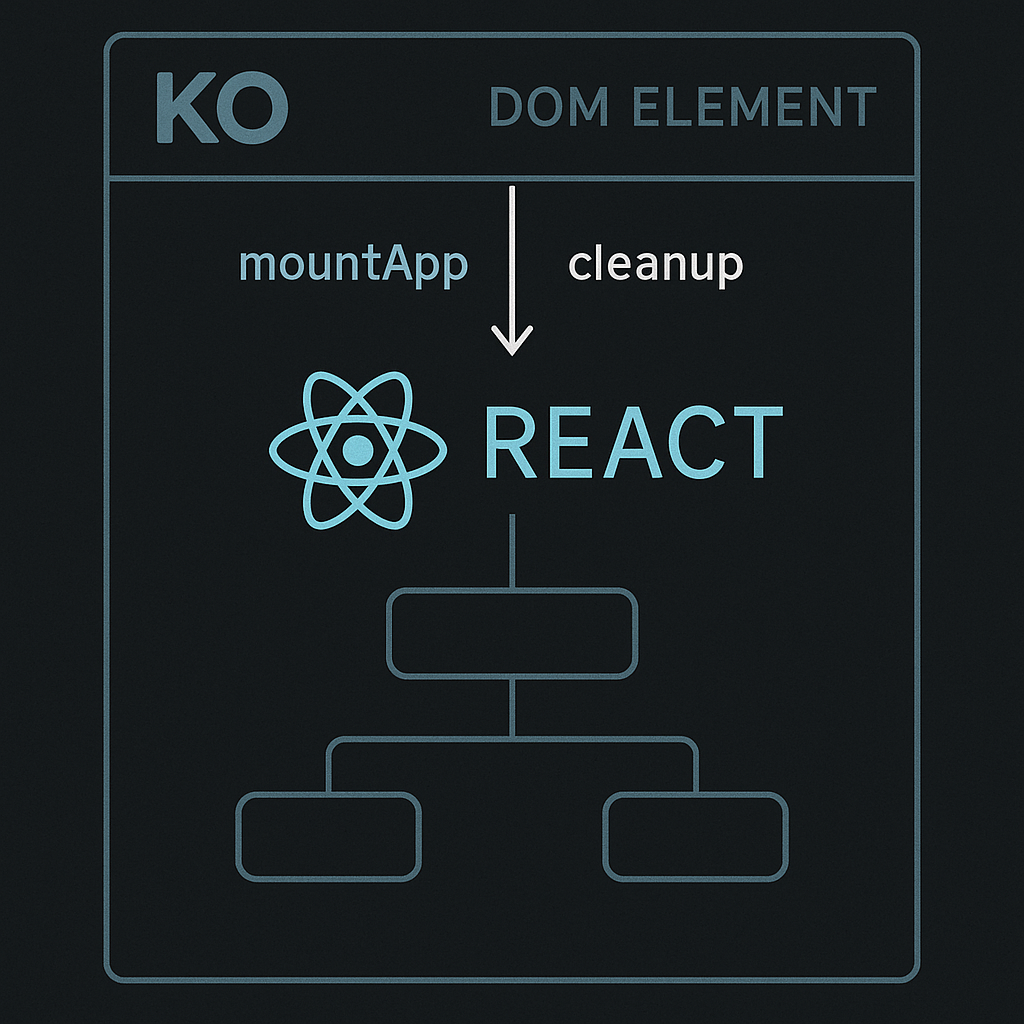
Scaffold a React project with Create React App using the Create React App documentation (`npx create-react-app`) or your preferred bundler.
Expose a mounting function in each component:
import React from 'react';

import ReactDOM from 'react-dom/client';

import App from './App';

export function mountApp(rootElement, props) {

  const root = ReactDOM.createRoot(rootElement);

  root.render(<App {...props} />);

  return () => root.unmount();

}
In your Knockout template, call that `mountApp` inside a custom binding:
ko.bindingHandlers.reactMount = {

  init(el, valueAccessor) {

    const unmount = mountApp(el, valueAccessor());

    ko.utils.domNodeDisposal.addDisposeCallback(el, unmount);

  }

};
This shim ensures React and Knockout clean up properly, avoiding memory leaks.
Converting Core Patterns
From Observables and Computeds to State and Selectors
Knockout Pattern | React Pattern | Example Snippet Reference |
|---|---|---|
ko.observable | useState | `const [value, setValue] = useState(0);` |
ko.computed | createSelector (Reselect) | `const selectTotal = createSelector([selectA, selectB], (a, b) => a + b);` |
Custom extenders | custom hooks (e.g. useThrottled) | `const value = useThrottled(input, 300);` |
Observables → `useState`
// Knockout

self.name = ko.observable('Alice');

// React

const [name, setName] = useState('Alice');
Computed → memoized selectors
// Knockout

self.fullName = ko.computed(() => `${self.first()} ${self.last()}`);

// React with Reselect

import { createSelector } from 'reselect';

const selectFullName = createSelector(

  state => state.first,

  state => state.last,

  (first, last) => `${first} ${last}`

);
Custom extenders → custom hooks
Turn a Knockout extender like `rateLimit` into a hook using `useDeferredValue` or `useTransition`:
function useThrottled(value, ms) {

  const [throttled, setThrottled] = useState(value);

  useEffect(() => {

    const id = setTimeout(() => setThrottled(value), ms);

    return () => clearTimeout(id);

  }, [value, ms]);

  return throttled;

}
Binding Handlers to Controlled/Uncontrolled Components
Knockout binding handlers map directly to React patterns:
Value binding → controlled inputs
Custom bindings → custom hooks + refs
Two-way binding
For complex two-way sync, wrap a controlled input and expose callbacks:
function TwoWayInput({ value, onChange, ...props }) {

  const [internal, setInternal] = useState(value);

  useEffect(() => setInternal(value), [value]);

  return (

    <input

      {...props}

      value={internal}

      onChange={e => {

        setInternal(e.target.value);

        onChange(e.target.value);

      }}

    />

  );

}
Observable Arrays → Immutable Updates & Virtualized Lists
Use React’s immutable update patterns or Immer’s API to avoid in-place mutations.
For large lists, leverage keys for reconciliation and react-window for virtualization , preventing performance regressions when rendering thousands of items.
Integrating React into Your Knockout App
Embedding and Lifecycle Management
Knockout → React. Use the `reactMount` binding shown above.
React → Knockout. Insert a `div` in your React component and call Knockout’s ko.applyBindings documentation in a `useEffect` cleanup:
useEffect(() => {

  const viewModel = { / ... / };

  ko.applyBindings(viewModel, ref.current);

  return () => ko.cleanNode(ref.current);

}, []);
This two-way embedding lets you migrate feature by feature.
Avoiding Memory Leaks
Whenever you mount a React component inside Knockout:
Always call `unmount()` when the DOM node disposes.
Use `ko.utils.domNodeDisposal.addDisposeCallback` to tie cleanup to Knockout’s lifecycle.
Advanced Migration Topics
Validation: From knockout-validation to React Hook Form
Replace `knockout-validation` rules with React Hook Form and schema validators like Zod or Yup.
Real-time and async rules map naturally to React Hook Form’s resolver and `trigger` APIs.
Topic | KnockoutJS Approach | React Approach |
|---|---|---|
Validation | `knockout-validation` rules | React Hook Form + Zod/Yup schema validators |
Pub/Sub | `ko.subscribable` events | Context API, Redux Toolkit (slices/RTK Query), RxJS Observables |
Routing | Sammy.js / Crossroads.js | React Router (`<Routes>/<Route>`, `useAuth`, `BrowserRouter`, `HashRouter`) |
Internationalization | KO binding-driven text updates | react-i18next: plurals, interpolation, lazy-loaded namespaces |
Error Handling | Silent errors (in observables, silent/hidden issues) | Error Boundaries (class component with `componentDidCatch` for consistent rendering error handling) |
Pub/Sub to Context API, Redux Toolkit or RxJS
Turn your `ko.subscribable` events into:
React Context for lightweight state sharing.
Redux Toolkit slices and RTK Query for normalized state and caching.
RxJS Observables for complex async pipelines.
Routing: Sammy.js/Crossroads → React Router
Swap your old router with React Router :
`<Routes>` / `<Route>` for nested routes.
Route guards via custom hooks (`useAuth`).
Preserve deep links with `BrowserRouter` or `HashRouter`.
Internationalization: KO Bindings → React-i18next
Migrate your binding-driven text updates to react-i18next .
Handle plurals, interpolation and lazy-loaded namespaces without blocking renders.
Error Handling: Knockout Silent Errors → Error Boundaries
Wrap subtrees with an `ErrorBoundary` (class component with `componentDidCatch`) to catch rendering errors and log them consistently.
Performance and Build Optimization
Reducing Redundant Renders
Batch state updates with React 18’s automatic batching.
Use `useDeferredValue`, `useTransition` or `lodash.debounce` for input-heavy forms.
Memoize expensive children with `React.memo` and selectors.
Bundling and Code Splitting
Convert old Knockout-era globals to ES modules.
Use React.lazy and Suspense for route-based splitting.
Maintain legacy CDN scripts temporarily in public HTML until full migration.
CSS Migration
Transition from KO class toggles to CSS-in-JS (Emotion, styled-components) or utility classes (Tailwind).
Map dynamic class logic to React state or props to avoid layout thrashing.
Testing and Debugging
React Testing Library vs. ViewModel Specs
Convert your Knockout viewmodel unit tests to integration tests using React Testing Library .
Focus on user-centric assertions: “when I click Submit, I see a success message.”
Time-Travel and Profiling
Plug into Redux DevTools ( Redux DevTools Extension ) if using Redux Toolkit.
Use React Profiler in the browser to identify slow renders and fix them before they hit production.
The Final Phase: Sunsetting Knockout
Decommission Plan
Track bundle size and ensure all `ko.*` identifiers are removed.
Set bundle size targets and fail CI builds if legacy code creeps back in.
Remove Knockout runtime and polyfills once every feature is ported.
Team Enablement
Create a KO-to-React Translation Cookbook with code snippets for common patterns.
Build codemods or ESLint rules to catch leftover bindings or extenders.
Hold workshops or pair-programming sessions to spread knowledge.
Beyond the Migration: Your Next Destination
You’ve now got a full blueprint—from basic state conversion to advanced patterns, performance, routing, validation and beyond. Incrementally embed React, convert patterns into hooks and components, then systematically remove Knockout. By following this roadmap, you’ll end up with a robust, maintainable React codebase and a team ready for future challenges. Good luck on your React journey!
:format(webp))
:format(webp))
:format(webp))