:format(webp))
:format(webp))
Headless CMS: A Comprehensive Guide to Pros, Cons, and Beyond
By the end of this guide, you’ll understand what a headless CMS is, its main advantages and drawbacks, real-world use cases, and advanced topics like SEO, localization, and vendor lock-in that aren’t covered in most overviews.
What Is a Headless CMS?
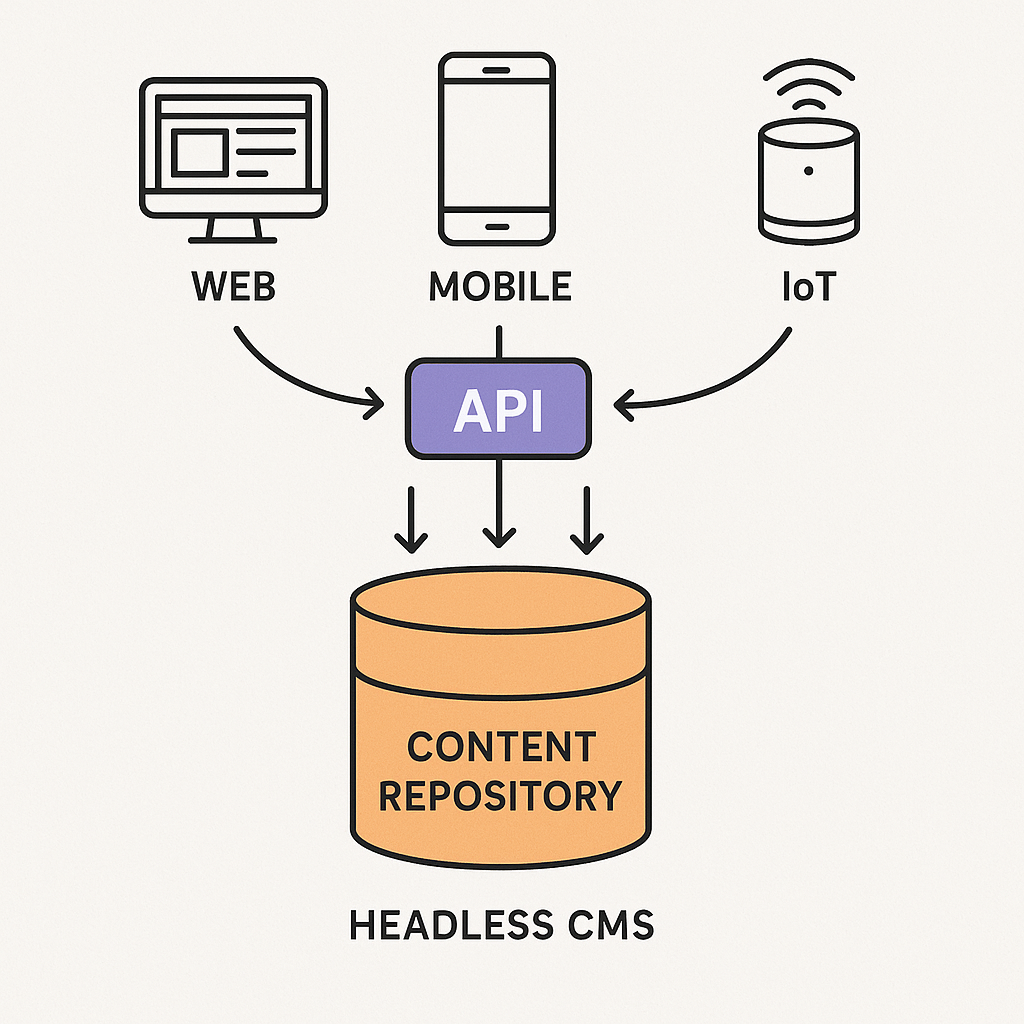
A headless CMS separates the content repository (“body”) from its presentation layer (“head”). Instead of delivering HTML directly, it exposes content via APIs so you can display it on websites, mobile apps, IoT devices, and more.
API-First Approach
All interactions happen through RESTful API design principles , giving developers freedom to pick their front-end technology, or via GraphQL endpoints for precise data queries.
Content as a Service (CaaS)
Your CMS becomes a back-end content hub. Any client—web, mobile, or wearable—can fetch and render content as needed.
(Source: [Wikipedia article on Headless CMS](https://en.wikipedia.org/wiki/Headlesscontentmanagement_system))
Key Benefits of a Headless CMS
Benefit | Description |
|---|---|
Omnichannel Delivery | Publish once, display everywhere—websites, apps, kiosks, smartwatches. |
Developer Flexibility | Choice of frameworks (React, Vue, Angular, etc.) without constraints. |
Scalability | Independent scaling of content APIs. |
Performance Gains | Use of static site generators and CDNs for fast load times. |
Enhanced Security | Content store not directly exposed to the public web; only APIs are. |
Omnichannel Delivery
Publish once, display everywhere—websites, apps, kiosks, smartwatches.
Developer Flexibility
Use React, Vue, Angular, or native mobile frameworks without CMS constraints.
Scalability
Content APIs can be scaled independently of your front end.
Performance Gains
Static site generators (e.g., Next.js) and CDNs can cache API responses for lightning-fast load times.
(See Server-side rendering )
Enhanced Security
Your content store isn’t directly exposed to the public web; only API endpoints are.
Common Challenges
Implementation Complexity
You must build or integrate a front end from scratch, versus relying on built-in themes in traditional CMSs.
Preview and Editing
Real-time WYSIWYG previews require custom tooling or third-party packages.
Marketing Workflow Changes
Nontechnical editors may need new interfaces or training to manage content.
Headless CMS vs. Traditional CMS
Traditional CMSs (like WordPress or Drupal) bundle content editing, storage, and delivery in one system. They’re user-friendly for marketing teams but can limit developers to specific languages, templates, or plugins. Headless CMSs decouple these layers, trading off out-of-the-box ease for greater flexibility and performance.
Top Use Cases
Use Case | Description | Example |
|---|---|---|
Omnichannel Experiences | Consistent storytelling | Web + App + IoT |
Mobile Applications | Shared APIs | iOS/Android apps |
IoT and Digital Signage | Dynamic content on fridges/kiosks | Digital signage, in-store displays |
SPAs | Fast API loading in React/Vue/Angular | Single-Page Applications |
Omnichannel Experiences
Consistent brand storytelling across websites, mobile apps, email, and IoT.
Mobile Applications
Native iOS/Android apps pull content through the same APIs you use for your website.
IoT and Digital Signage
Fridges, kiosks, or in-store displays fetch dynamic content on the fly.
Single-Page Applications (SPAs)
Front ends built with React, Vue, or Angular benefit from fast API-driven data loading.
Advanced Considerations
SEO and Headless CMS
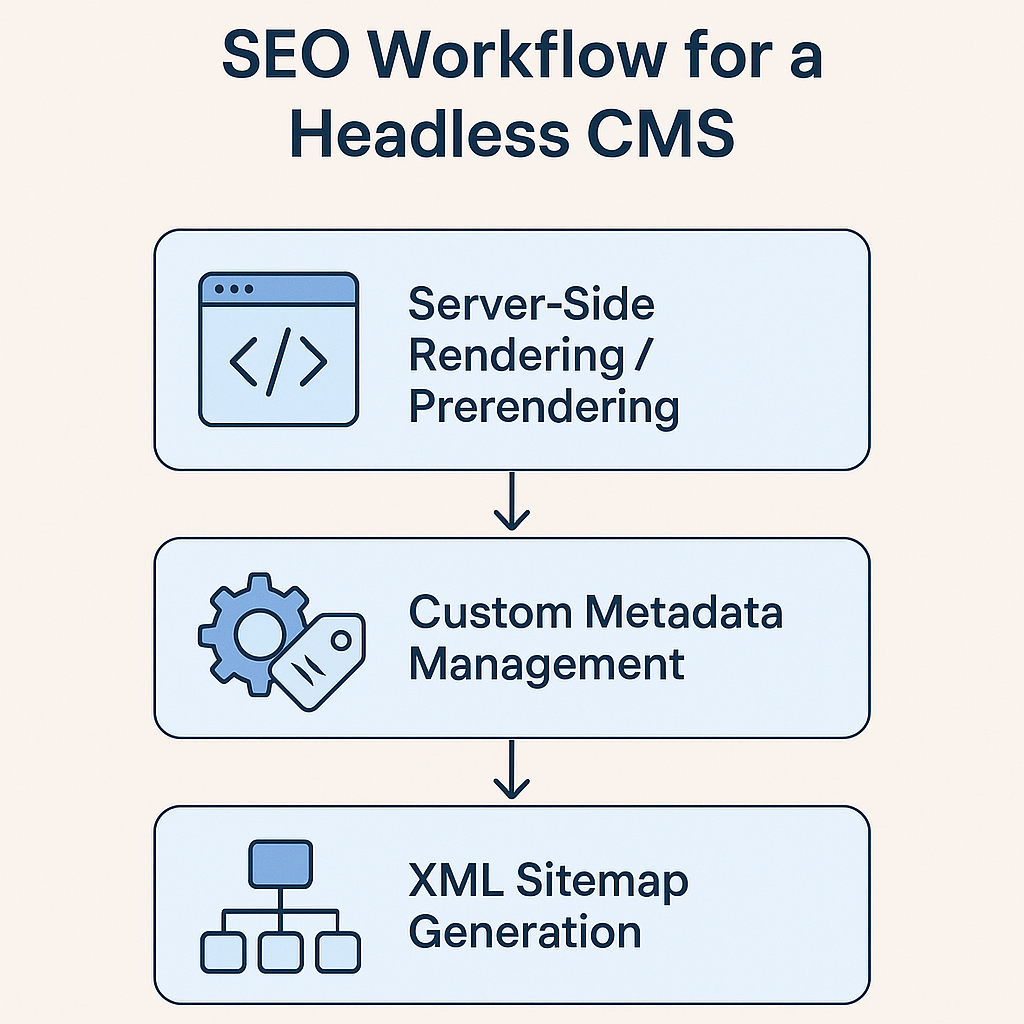
Search engines rely on HTML metadata, structured data, and sitemaps—features often auto-generated by traditional CMSs. With a headless setup, you must:
Implement server-side rendering or prerendering for crawlable HTML.
Build custom metadata management interfaces.
Generate and host XML sitemaps.
(Source: Google’s SEO Starter Guide )
Localization and Multilingual Content
Handling multiple languages demands:
A translation workflow integrated with your CMS.
Region-specific content delivery strategies.
URL structure conventions (e.g., `/en/`, `/es/`).
(Source: W3C Internationalization Guide )
Content Modeling Flexibility
You can create highly granular content types—articles, product specs, event schedules—and define relationships between them. This supports tailored user experiences but requires upfront design and planning.
(Source: Strapi Content-Type Builder )
Integration with Modern Front-End Frameworks
A headless CMS is a natural fit for:
React/Next.js and static site generation
Vue/Nuxt.js for progressive web apps
Angular Universal for server rendering
(Source: Next.js Documentation )
Vendor Lock-In Risks
Proprietary APIs and custom data structures can make migrating to another CMS harder than with a monolithic system. Always evaluate:
Data export formats (JSON, CSV)
API versioning policies
Community support and open-source alternatives
(Source: Investopedia’s definition of vendor lock-in )
Your Next Steps in Headless CMS
Implementing a headless CMS can transform how you deliver content, but it also shifts responsibilities—from SEO and previews to localization and long-term portability—onto your team. By planning content models carefully, choosing frameworks that support SEO out of the box, and evaluating vendors for data portability, you’ll set up a solution that scales across channels and markets.
:format(webp))
:format(webp))
:format(webp))